
Your cards are set up and your team is in. Before you load funds, it helps to spend two minutes thinking about how you want to organise your company spending because Swipey gives you more control than a regular bank account, and a little planning upfront saves a lot of cleanup later.
Think in Budgets, Not Just Balances
Most people's first instinct is to deposit a lump sum and figure it out later. That works, but you'll get a lot more out of Swipey if you think about it differently.
Instead of: "I'll put in RM5,000 and see how it goes"
Think: "Who on my team needs to spend, on what, and roughly how much per month?"
Once you know that, you assign each person a card with a limit that matches their actual needs. No overspending, no awkward conversations, no surprises at month end.
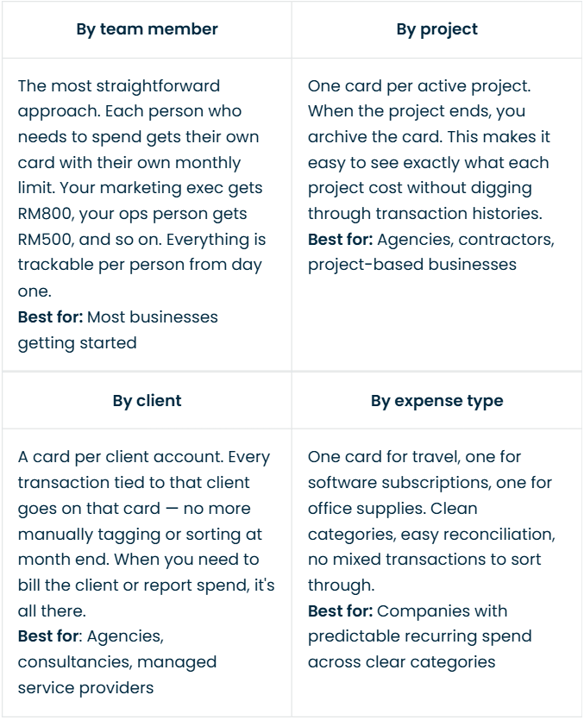
Common Ways Swipey Admins Organise Their Spend
There's no single right way. It depends on your business. Here are the most common setups we see:
How Much Should You Start With?
You don't need to load your full operating budget on day one. Most Swipey admins start with RM100–RM500 for their first load. That's enough to:
- Activate your first card
- Make a real test transaction
- See how the dashboard and receipts work in practice
You can top up anytime, so there's no pressure to load everything at once. Start small, see how it feels, then set your regular top-up rhythm from there. A simple way to think about it: add up one week's worth of the expenses you want to move onto Swipey first. Start there.
Ready to Load Your First Budget?
Once you know how you want to structure your team's spend, loading funds takes under two minutes.
👉 Log in to Swipey and make your first deposit
👉 Learn how to deposit
Need Help Figuring Out the Right Setup for Your Business?
Book a free 30-minute Finance Ops session with our team and we'll help you map it out.
📞 Book a Swipey Success Session
If You're Having Trouble, Reach Out to Us!
📞 Book a 30 min session and we'll walk you through the process