
Your Swipey Travel card (Physical card) works for in-store, travel and contactless payments. It takes 4 steps to go from approval to your first tap.
✅ Before you start
- eKYC must be approved. The person named on the card has to finish eKYC first. If it isn’t done yet, complete your eKYC and come back here.
- Have the Swipey mobile app ready. Activation only works in the mobile app, not on the web dashboard.
Step 1: Log in to the Swipey mobile app
Log in to the app as the cardholder. Your card is sent for printing only after your first full login, so do this as soon as your eKYC is approved.
📌 Note: The card won’t be printed until you log in. Logging in early means your card arrives sooner.
Step 2: Wait for your card to arrive
Delivery usually takes 7 to 10 working days. When your card is out for delivery, we’ll email you a tracking link.
Step 3: Set your 6-digit card PIN
Once the card arrives:
-
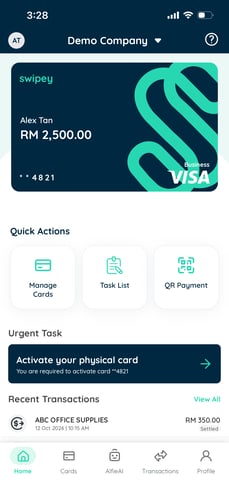
Open the Swipey app and tap Activate your Swipey Travel Card (physical card) on the Home screen
-
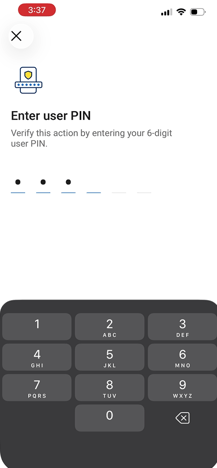
Enter your app User PIN
-
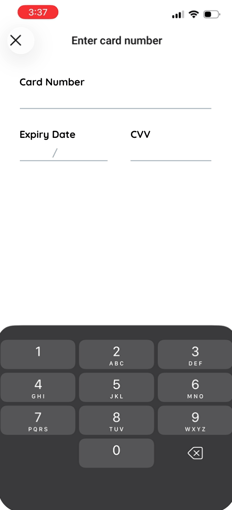
Enter your card details: Card Number, Expiry Date and CVC
-
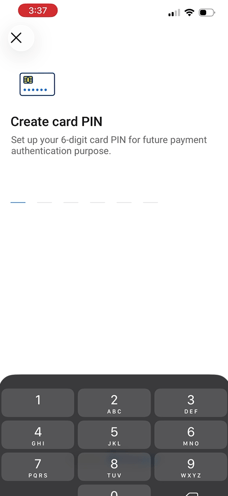
Create your new 6-digit card PIN and enter it again to confirm
⚠️ Your card PIN and your app User PIN are not the same thing
| PIN | What it’s for |
|---|---|
| App User PIN | Logging in to the Swipey app and confirming actions in it |
| Card PIN (6 digits) | Paying at card terminals and withdrawing cash at ATMs |
Use a different number for each, and never share either one.
Step 4: Make your first payment with Chip and PIN
Insert your card into a payment terminal and enter your 6-digit card PIN.
💡 Tip: Contactless (payWave) stays off until this first Chip and PIN payment goes through. After that, you can tap to pay.
🎉 That’s it. Your card is active and ready to use.
❓ Frequently asked questions
I haven’t received a tracking email. What should I do?
Check that the cardholder has logged in to the app at least once, because the card isn’t printed until they do. If they have and it’s been more than 10 working days, contact us and we’ll check the delivery status.
I don’t see “Activate your Swipey Travel Card (physical card)” in the app.
You’ll only see it after your card has been issued. Make sure you’re logged in as the person named on the card.
Why didn’t my tap payment work?
You need to make one Chip and PIN payment before contactless turns on. Insert your card and enter your PIN once, then try tapping again.
Can I use my app User PIN at a card terminal?
No. Terminals only accept the 6-digit card PIN you set in Step 3.
📖 Related articles
How to Reset Your Swipey Travel Card (Physical Card) PIN on Mobile · Fees, Charges & Spending Limits